


Presenter Kiosk Printers
Controlled Ticket Delivery for Self-Service Terminals
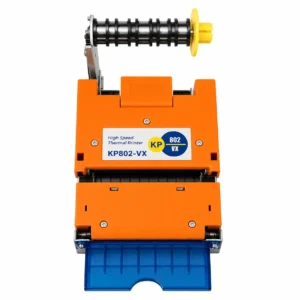
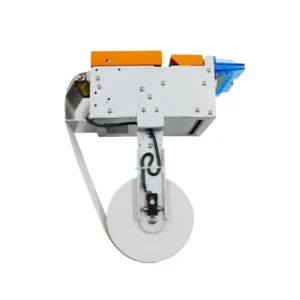
A presenter kiosk printer is used in unattended terminals where a printed ticket or receipt should not be released immediately after printing.
The printer can hold the printed media inside the presenter, release it at the required stage of the transaction and detect whether it has been collected. In systems with a retract function, uncollected tickets can be removed from the output area after a preset timeout.
This type of printer is commonly used in parking terminals, ticket vending machines and self-service payment equipment.
The key difference from a standard kiosk printer is simple: the system controls the delivery process instead of ejecting the ticket immediately after printing.
How the Presenter Works
A typical workflow is:
Print → Hold → Present → Take → Timeout → Retract
The printer completes the print job and keeps the ticket inside the presenter path. The kiosk then presents it when the transaction reaches the required stage, such as payment approval or access authorization.
A sensor can confirm whether the user has taken the ticket. If it remains uncollected, the system can handle it according to the configured workflow, including retraction where supported.
The actual command sequence depends on the printer protocol and the kiosk software.
Key Functions
Controlled Presentation
The ticket is released only when the kiosk sends the appropriate command.
Anti-Pull Protection
The presenter keeps the media inside the mechanism during the print cycle, reducing the risk of premature pulling.
Ticket Take Detection
The printer can report whether the ticket has been collected, allowing the application to manage the next transaction step.
Retraction of Uncollected Tickets
For unattended terminals, leaving tickets outside the machine can create operational or privacy issues. A retract function removes uncollected media after the configured timeout.
Status Feedback
Typical feedback may include:
- Paper near end
- Paper out
- Ticket presented
- Ticket taken
- Ticket retracted
- Cover open
- Paper jam
Typical Applications
Parking Payment and Exit Terminals
Tickets, receipts or payment vouchers can be released after payment confirmation or access authorization. Uncollected documents can also be handled without leaving them exposed at the terminal.
Ticket Vending Machines
Used in transportation and automated ticketing equipment where printing and ticket delivery are separate stages of the transaction.
Self-Service Payment Kiosks
Suitable for systems that need to complete payment before releasing a receipt or transaction document.
Transportation and Access Terminals
Used for travel tickets, access credentials and other printed documents where collection confirmation is part of the workflow.
Integration Considerations
In presenter-based kiosk projects, the printer mechanism, kiosk structure and software workflow need to be evaluated together.
Media and Ticket Size
Confirm:
- Paper width and thickness
- Ticket length
- Roll or fanfold media
- Continuous or pre-cut format
For longer or thicker media, check the available space inside the printer and kiosk.
Output Bezel Design
The output opening should align with the presenter and allow the ticket to move freely.
A narrow or misaligned bezel can interfere with both presentation and retraction. For new terminal designs, the printer should be tested with the actual front panel before production.
Installation Space
A presenter mechanism usually requires more installation depth than a standard kiosk printer.
The complete media path and clearance around the output area should be included in the mechanical layout.
Software and Sensor Control
The application may need to handle:
- Print commands
- Presenter control
- Ticket taken status
- Timeout handling
- Retraction
- Printer status monitoring
Before development, confirm the available SDK or command protocol and test the required workflow.
Retention Requirements
If uncollected tickets need to be stored inside the terminal, confirm the retention method and capacity during model selection.
Presenter Printer vs. Standard Kiosk Printer
| Feature | Presenter Kiosk Printer | Standard Kiosk Printer |
|---|---|---|
| Ticket Delivery | Controlled presentation | Direct output |
| Hold Before Release | Yes | Usually no |
| Take Detection | Usually available | Limited |
| Uncollected Ticket Handling | Retraction or retention available on suitable models | Usually remains at output |
| Typical Application | Unattended transaction terminals | General kiosk and receipt printing |
A standard kiosk printer is suitable when the printed document can be delivered immediately.
A presenter printer is a better fit when the system needs to control when the ticket is released, confirm collection and handle documents that are left behind.
FAQ
Can a user pull the ticket before the print cycle is finished?
The presenter keeps the printed media inside the mechanism until it reaches the presentation stage. The actual anti-pull performance also depends on the presenter design and the kiosk output bezel.
What happens if the user does not take the ticket?
The system can use the presenter sensor to detect that the ticket remains uncollected. With a retract function, it can then be pulled back after the configured timeout.
How should the kiosk output bezel be designed?
The bezel opening should match the printer output and leave enough clearance for the media to move without friction.
Incorrect alignment or pressure from the front panel is a common cause of presentation and retraction problems.
Can the presenter be controlled through SDK or serial commands?
Yes, subject to the printer's interface and command protocol. Typical control includes printing, presentation, status checking and retraction where supported.
The required workflow should be confirmed before software development starts.
What is needed to select a suitable presenter printer?
Please provide:
- Ticket width, length and thickness
- Media type and supply method
- Required presentation and retract workflow
- Expected transaction volume
- Kiosk installation space
- Output bezel or front panel drawing
- Required interface and operating system
A ticket sample and kiosk drawing are the best starting point for checking media compatibility and mechanical integration.
Presenter Printers for Kiosk Projects
For presenter-based terminals, reliable operation depends on more than printer specifications.
The media, presenter path, output bezel and software workflow all need to match the actual application.
SNROTEK can evaluate the suitable configuration based on your ticket specification, workflow and kiosk structure.
Send us your ticket sample or kiosk drawing for integration evaluation.


